
If you run a small business, you already know how many small decisions land on your desk in a single week. Which supplier to use, what to charge, whether to reply to that email now or later. Business cards rarely make it onto the list of things worth thinking hard about. You order a box, hand them out until they run out, and order again when something changes. It works well enough, so why change it?
The answer is that digital business cards quietly solve a handful of problems small businesses deal with all the time, and they do it without asking for much in return. They cost little to set up, they don’t need a technical background, and they give a small team a level of polish that used to require a bigger budget. This guide looks at how small businesses can actually use them, in practical terms, with real examples of where they help most.
What a Digital Business Card Actually Does for a Small Business
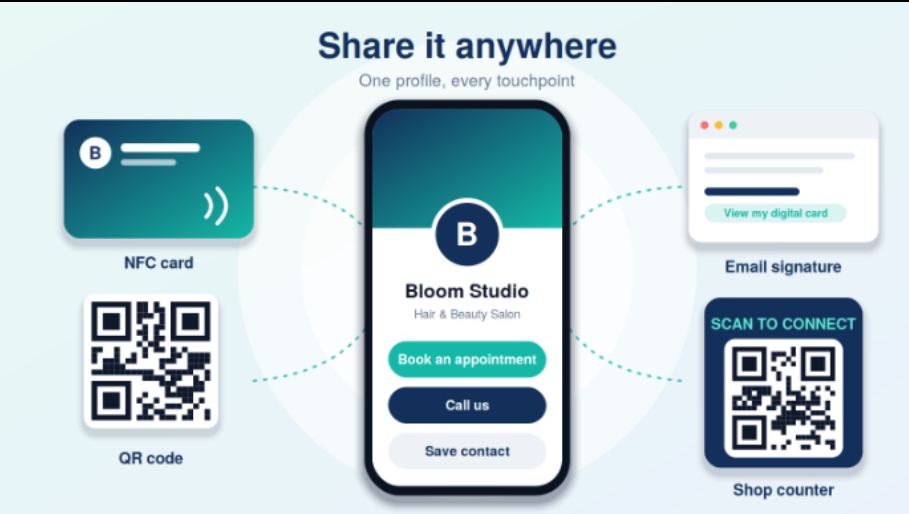
A digital business card is a shareable profile that holds your contact details and anything else you want people to see: a short description of your business, your website, your social pages, a booking link, maybe a few photos of your work. You share it by tapping a card against someone’s phone, scanning a QR code, or sending a link. The person on the other end doesn’t need to install anything.
For a small business, the appeal isn’t the technology itself. It’s what it replaces. Instead of a small rectangle of cardstock that can hold about five lines of text, you get a page you control, which you can change any time and which does more than just sit in someone’s wallet.
Start With the Problem You Actually Have
The best way to decide how to use a digital business card is to think about which problem you most want to fix. Different small businesses tend to care about different things. A hairdresser wants more bookings. A plumber wants people to save their number so they can find it when the boiler breaks. A boutique owner wants customers to follow their social pages. A freelance designer wants potential clients to see their portfolio before they call.
A digital card can handle all of these, but only if you build it around the one thing you want people to do next. A card that tries to do everything ends up doing nothing particularly well. Pick one main action, make it the most obvious thing on the profile, and let everything else sit quietly underneath it.
Turning a Card Into a Booking Tool
For service businesses, this is often the most valuable use. Think of salons, personal trainers, cleaners, tutors, photographers and consultants, anyone whose work depends on appointments. Adding a booking link to your card means someone can go from meeting you to booking a slot in a couple of taps, while they still remember who you are.
Compare that with the usual sequence: they take your card, put it in a pocket, find it a week later, decide whether to call, play phone tag, and eventually book. Every step in that chain loses a few people. Shortening it, even slightly, tends to bring in a few extra bookings a month, which for a small business is a noticeable difference.
Making It Easy to Save Your Number
Tradespeople and local service providers, such as electricians, builders, mechanics and locksmiths, often get work because someone had their number when they needed it. The trouble with a paper card is that it gets lost in a drawer, and the number is only useful if the person can find it at the right moment.
A digital card’s “Save Contact” button puts your details straight into the person’s phone. Once you’re in their contacts, you’re a search away in an emergency, which is exactly when these businesses get their best jobs. It’s a small change, but it fits the way people actually look for help.
Showing Your Work Instead of Describing It
Some businesses are easier to explain by showing than telling. A landscaper, a baker, a graphic designer or a wedding photographer can describe what they do all day, and it still won’t be as persuasive as a handful of good photos. A digital card gives you room to link to a gallery, a portfolio, or an Instagram page, so the first impression includes actual evidence of your work.
This is especially helpful when you’re meeting people casually, at a market, a local event or a friend’s party, where a formal sales pitch would feel out of place. A quick tap lets them look at your work in their own time, without any pressure.
Keeping Everything Current Without Reprinting
Small businesses change constantly. Opening hours shift, prices update, a new service is added, a phone line gets swapped. Each of these changes makes a batch of printed cards slightly wrong, and small business owners are often the type to keep handing them out anyway, because reordering feels like a hassle.
With a digital card, you update the profile once and it’s right for everyone from then on. Seasonal changes, a new location or a temporary promotion can go live in a few minutes. That flexibility is particularly useful for businesses that adapt quickly, like cafes, pop-up shops and market stalls.
Helping a Small Team Look Consistent
Once you have even two or three people, keeping things consistent becomes surprisingly hard. One employee has a card with the old logo, another has one with a slightly different phone number, and a third doesn’t have one at all. Individually, these don’t matter, but together they make a small business look less organised than it really is.
Most digital card platforms let you set up a shared template, so every team member’s card carries the same logo, colours and layout, with only their own name and details changed. It’s an easy way to look like a cohesive business without any extra effort each time someone joins.
What It Costs, Compared With What You’re Doing Now
Cost is usually the first question, and it’s a fair one. The comparison below is a rough guide to how the two approaches tend to differ for a typical small business over a couple of years. Exact prices vary between providers, so treat it as a way of thinking about the trade-offs rather than a quote.
|
Consideration |
Printed Cards |
Digital Business Card |
|
Upfront cost |
Low per batch |
Slightly higher for the first card |
|
Cost when details change |
New print run needed |
Free, edit the profile |
|
Time to make a change |
Days to weeks |
A few minutes |
|
Cost over two years |
Repeats with every reorder |
Mostly a one-off |
|
Team consistency |
Depends on who reorders when |
Shared template keeps it aligned |
|
Space for information |
A few lines |
As much as you need |
|
Knowing if it worked |
No visibility |
Basic view and tap data |
The digital card usually costs a little more at the start and less over time. If you reprint even once a year, the balance tips fairly quickly.
Using Simple Data to Make Better Decisions
Small businesses rarely have a marketing budget for measuring things, which makes it hard to know which efforts are worth repeating. Should you keep paying for that stall at the weekend market? Is the local business breakfast worth giving up a morning?
Many digital card platforms show how many times your card was viewed or tapped, and sometimes which links people clicked. You don’t need to become an analyst. Even noticing that one event produced twenty taps and another produced two can help you decide where to spend your limited time. It’s a light form of feedback that used to be impossible to get from paper.
Where to Use It Beyond Handing It Over in Person
A digital card isn’t only for face-to-face moments. Because it’s a link, you can use it in more places than a paper card ever could. It works well in an email signature, on your invoices, in your social media bio, on a shop window as a QR code, or on a flyer. Each of these turns an ordinary touchpoint into a way of getting people to your profile.
A QR code on a delivery van, a shop counter or a table tent is a quiet, low-cost way to give people a route from noticing your business to contacting it. Small businesses that already have physical spaces or vehicles have plenty of surfaces that can do this job.
A Simple Way to Get Started
You don’t need a big plan. A sensible first step is to set up a basic profile with your business name, a one or two sentence description, your phone number, your website or social page, and one main action, such as booking or calling. Test it on your own phone, then on a friend’s. Once it’s working, start using the link and QR code in a couple of places, and add a physical NFC card if you meet people in person often.
After a month or two, look at how it’s being used and adjust. Add a link if people keep asking for something, remove one if it never gets clicked. A digital card is easy to change, so there’s no need to get it perfect the first time.
Common Mistakes Small Businesses Make
The most common mistake is treating the card as a one-time setup. Hours change, prices change, a link breaks, and the profile quietly becomes wrong. A quick review every few months is enough to prevent this.
Another is putting in too much. A profile with ten links, three calls to action and a long description feels cluttered, and people don’t know what to do. Less is almost always better. A third is skipping the test. Small businesses get busy, and it’s easy to hand out a card that doesn’t quite work. Taping it on your own phone takes seconds and avoids an awkward moment.
Frequently Asked Questions
Is a digital business card worth it if I’m a one-person business?
Yes, in most cases. A one-person business often benefits the most, since a good profile makes you look established, and a booking link saves you the back-and-forth of scheduling.
Do I need a physical NFC card, or is a QR code enough?
A QR code or link is enough to start. A physical NFC card is a nice addition if you meet people in person regularly, since it gives you something to hand over and makes the exchange feel smooth.
Will my customers know how to use it?
Almost certainly. Most people are used to scanning QR codes and tapping their phones for payments, and no app is needed to view your profile.
What if I’m not technical?
Most providers use simple, guided builders. If you can fill in a form and upload a photo, you can set one up. It usually takes well under half an hour.
How often should I update my card?
Whenever something changes, and give it a quick review every few months to check that links still work and information is current.
Can I still keep printed cards?
Of course. Plenty of small businesses keep a few printed cards for situations where a physical handover feels right, and use the digital card for everything else.
Final Thoughts
For a small business, the value of a digital business card isn’t in the novelty. It’s in the small practical gains it adds up: a quicker route to booking, an easier way for people to save your number, a profile that’s always up to date, and a consistent look across your team. None of it requires a big budget or technical skill, and you can start small and build from there. If your current cards are gathering dust in a drawer or quietly going out of date, a digital card is a low-risk change that tends to pay for itself.